Performance
Visibility
SEO &
Page Speed
Optimization
Faster pages, better rankings, and happier users with PageSpeed Insights.
Presented by binh.n
[FE / Easier]
2026-01-15
Table of Contents
What is SEO?
Definition and core concepts
Why Do We Need SEO?
Importance and key benefits
Ingredients of SEO
Technical, Content, and Authority
What is PageSpeed Insights?
Tool introduction & features
Why Improve Page Speed?
Impact on UX and rankings
Global vs Japan Index
Comparative performance data
How to Improve Page Speed
Practical tips & techniques
Results of My Work
Showcase of improvements
What's Next?
Future research plans
Q&A
Questions and discussion
What is SEO?
Search Engine Optimization is the practice of improving a site to increase the quality and quantity of organic traffic.
Key Focus Areas
Visibility in SERPs
Ranking higher on results pages
Relevant Audiences
Reaching users with intent
Measurable Conversions
Turning traffic into value
Why Do We Need SEO?
SEO is not optional—it's essential for business growth and digital presence.
Enhanced Visibility
Rank higher in search results, making it easier for potential customers to discover your brand organically.
Increased Traffic
Drive consistent, high-quality visitors to your site without relying solely on paid advertising.
Credibility & Trust
Users trust organic results more than ads. A strong SEO presence signals authority and legitimacy.
Long-Term Stability
Unlike paid campaigns, SEO investments compound over time, delivering sustainable results.
Cost Efficiency
Organic traffic doesn't require per-click payments, making SEO a budget-friendly channel for growth.
Better User Experience
SEO best practices (fast load times, mobile-friendliness) directly improve how users interact with your site.
Ingredients of SEO
Three main pillars for a well-optimized site: Technical, Content, and Authority.
Technical SEO
- Crawlability & Indexation
- Site Architecture & URLs
- Page Speed & Core Web Vitals
- Mobile-Friendliness
- Structured Data & Schema
Content SEO
- Keyword Research & Targeting
- High-Quality, Relevant Content
- Title Tags & Meta Descriptions
- Heading Structure (H1, H2, etc.)
- Internal Linking Strategy
Off-Page SEO
- Backlink Acquisition
- Domain Authority & Trust
- Social Signals & Engagement
- Brand Mentions & Citations
- Local SEO & Reviews
What is PageSpeed Insights?
A free tool from Google to analyze your page's performance and Core Web Vitals.
Largest Contentful Paint (LCP)
Measures loading performance. Aim for <2.5s for good UX.
Interaction to Next Paint (INP)
Evaluates responsiveness. A good score is <200ms.
Cumulative Layout Shift (CLS)
Tracks visual stability. Keep it <0.1 to avoid layout jumps.
Time to First Byte (TTFB)
Server response speed. Faster TTFB improves all other metrics.
Why Improve Page Speed?
Speed directly impacts user experience, conversions, and search rankings.
SEO Rankings
Google uses Core Web Vitals as a ranking factor. Faster sites get better visibility in search results.
User Experience
Slow pages frustrate users, leading to higher bounce rates and lost engagement opportunities.
Conversion Rates
Even 1 second of delay can reduce conversions. Speed = revenue for e-commerce.
Crawl Efficiency
Faster sites allow search engines to crawl more pages within their budget, improving indexation.
Accessibility
Fast-loading pages benefit users on slower connections or older devices, making your site more inclusive.
Competitive Edge
If your competitors' sites are faster, users will prefer them. Speed is a differentiator.
Page Speed Index: Global vs Japan
Comparing Core Web Vitals performance across regions.
Visualizing the distribution of user experiences based on Chrome User Experience Report (CrUX) data.
Performance Tiers
Observation
Japan shows a higher percentage of "Good" ratings (44%) compared to the global average (38%), indicating better infrastructure or optimized content delivery.
Mobile Experience Score Distribution
How to Improve Page Speed
Proven techniques to optimize performance and pass Core Web Vitals.
Optimize Images
- Use next-gen formats (WebP, AVIF)
- Compress with tools like ImageOptim
- Implement lazy loading
- Responsive images via srcset
Minify JS/CSS
- Remove whitespace and comments
- Combine files to reduce requests
- Use bundlers (Webpack, Vite)
- Tree-shake unused code
Reduce Render Blocking
- Inline critical CSS
- Defer non-critical scripts
- Use async for third-party JS
- Prioritize above-the-fold content
Font Optimization
- Use font-display: swap
- Preload key fonts
- Subset fonts for used characters
- Self-host fonts when possible
Server & Caching
- Enable gzip/Brotli compression
- Use CDN for static assets
- Set proper cache headers
- Optimize server response time
Core Web Vitals Focus
- Optimize LCP with image preloading
- Reduce INP via event delegation
- Prevent CLS with size attributes
- Monitor real-user metrics (RUM)
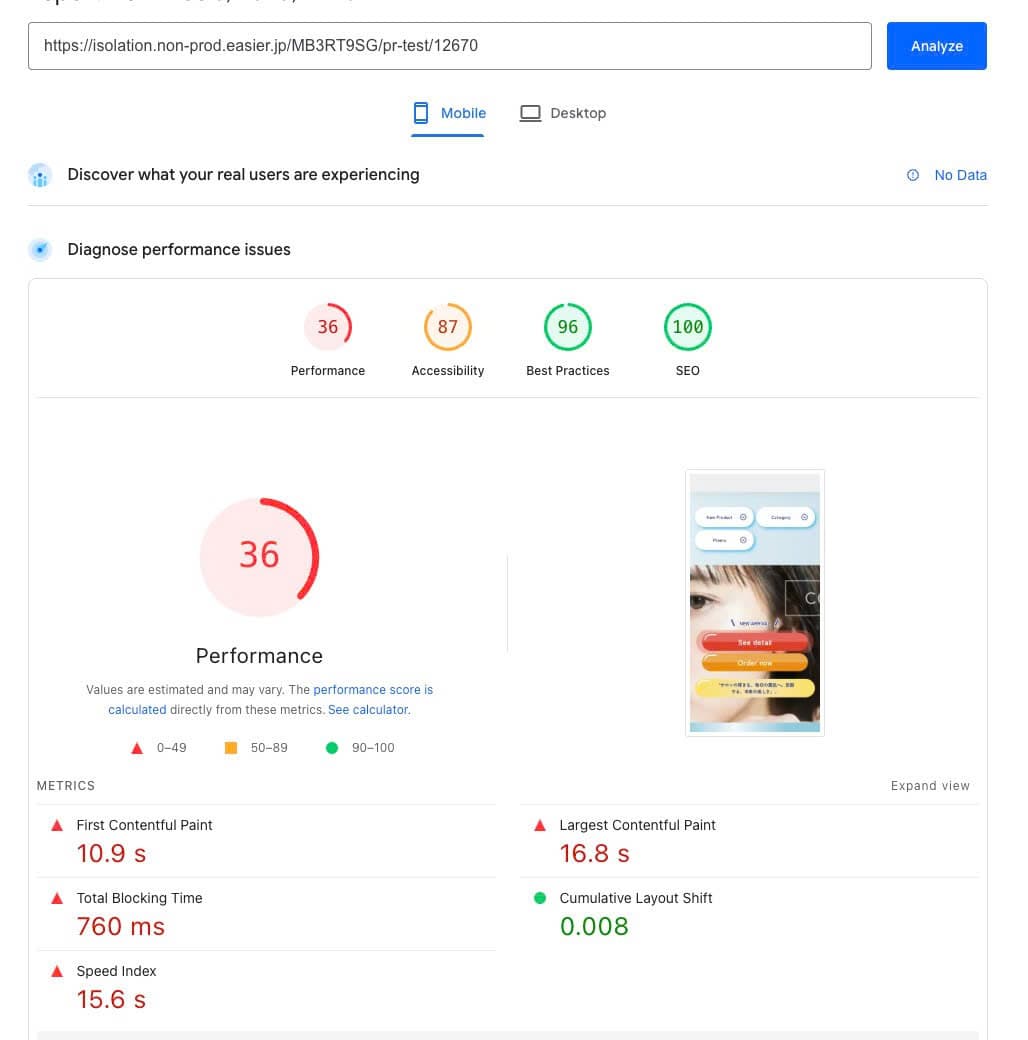
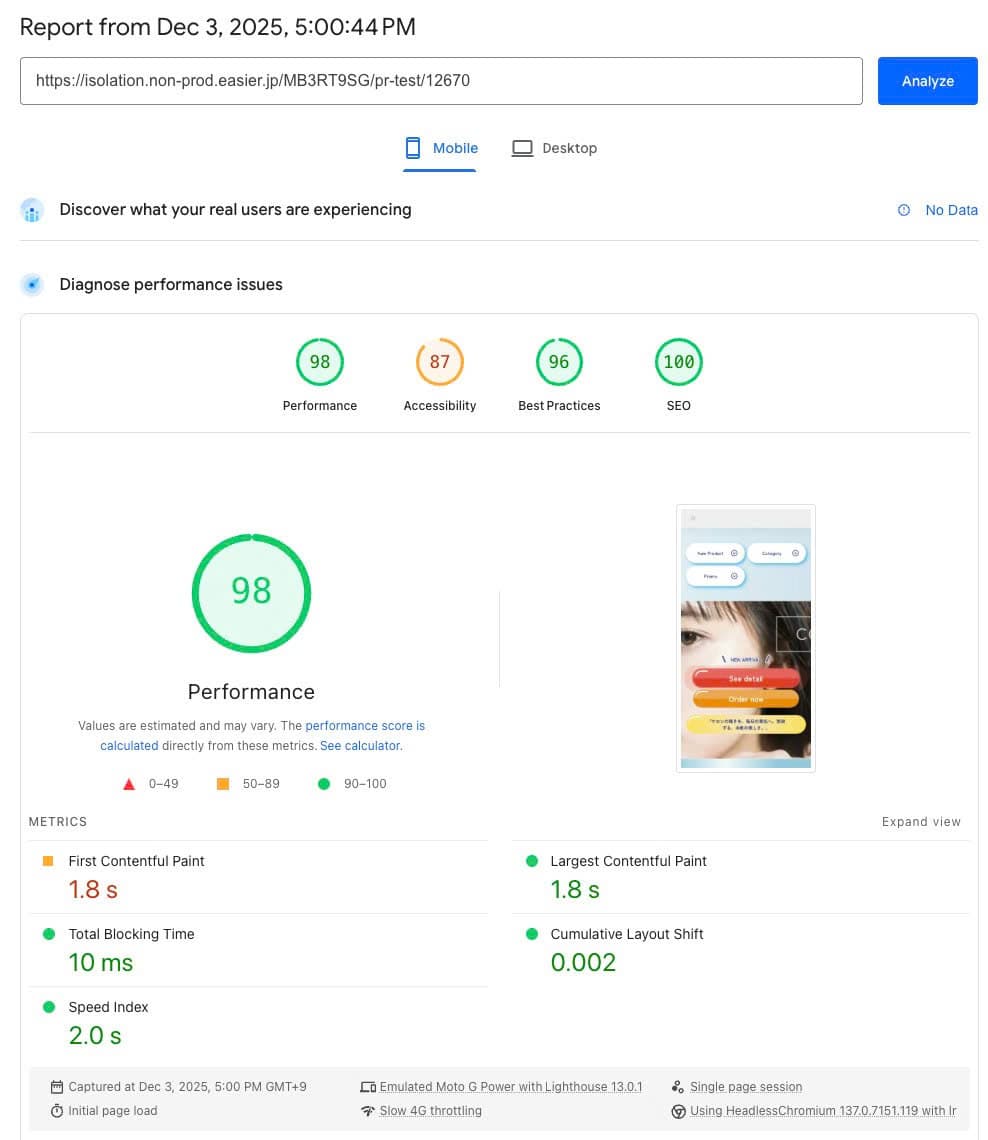
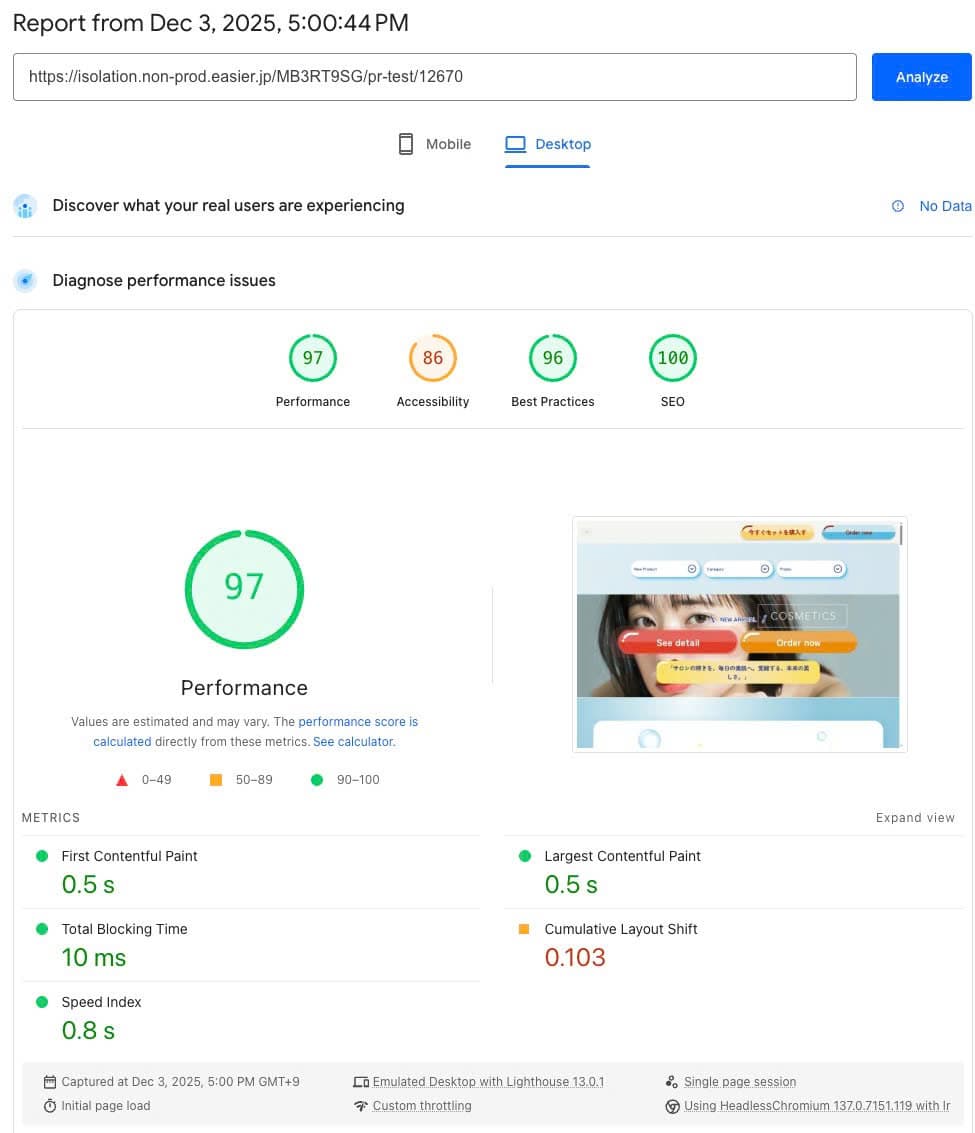
Results of My Work
Measurable improvements in PageSpeed Insights scores and Core Web Vitals.
Before Optimization

After Optimization
What's Next?
Continuous improvement and research roadmap for SEO & Performance.
Advanced SEO
Explore structured data, voice search optimization, and semantic SEO.
Analytics Deep Dive
Implement RUM (Real User Monitoring) and advanced tracking for CWV metrics.
Automation Tools
Build CI/CD pipelines to test page speed on every deployment automatically.
Edge Computing
Experiment with edge functions and serverless rendering for faster TTFB.
Competitive Analysis
Regular benchmarking against competitors' page speed and SEO strategies.
Q&A
Got questions? Let's discuss!
Thank you for your attention! — binh.n
Thank You!
Keep optimizing. Keep improving.
Let's make the web faster together.